What’s this? Another blog entry. Clearly I’m not busy.
For the last few years I’ve been helping a few telcos (mobile phone providers for the layman) with their monitoring requirements for the various platforms (4G and 5G). At this point they’ve been using VMware’s NFV bundle, which consists of vSphere (or Openstack), vSAN, NSX, vROps, vRLI, VRNI (optional) and VCD. Whew that’s a lot of product acronyms and it includes VCD; aka VMware Cloud Director or vRA for people that need multi-tenancy.
WARNING, that’s a massive simplification of both products but hey I do monitoring, automation was a decade ago using scripts and powershell, I don’t need vRA or vRO to build VCF (/rasp).
But wasn’t VCD discontinued? Err, yeah but no. Dull story about business requirements and market opportunities, blah blah blah. Anyway, it’s still around and it’s good if you need it.
A few things about how VCD structures stuff. The underlying physical hardware is grouped into normal vSphere clusters. This is presented via VCD as a Provider VDC (VDC = Organisation Virtual DataCentre). The PVDC is then used to provide the resources to a group called the Organisation VDC. The OrgVDC is basically a resource pool, with reservations and limits, that a end customer, called a tenant, can then consume.
Clear.
Nope. It can be complicated and they use totally different names for vSphere constructs. I was going to make a picture to illustrate this, but I stole one a long time ago (apologies to whomever made this but it’s mine now. I licked it):
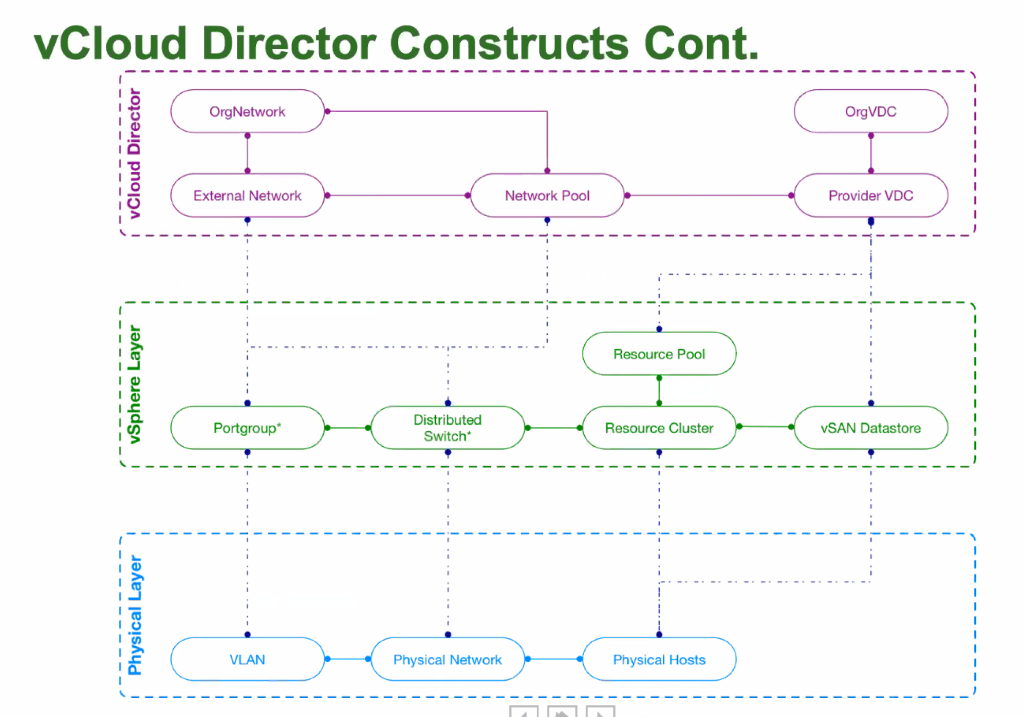
To adequately monitoring this you need to connect vROps to VCD. There’s a management pack for this. You need to be very careful to get the correct management pack that supports the version of VCD. There are two components:
- The management pack which connects to VCD
- The tenant OVA, which is an appliance which is a static application that merges data from VCD and vROps into a few static dashboards for tenants (end-users).
I’m going to talk about the VCD MP.
Firstly; the VCD MP that is compatible with vROps 6.7 does not capture metadata from VCD. It’s also incomplete and uses (or used it might have finally been fixed) the VCD User API interface not the VCD Admin API so its missing various metrics (or it has bugs some may say). You can script around this and then inject the metrics into VCD. Kinda cool, but its custom and GSS fear the word ‘custom’.
vROps 7 and its associated VCD MP fixed a bunch of these issues. To collect the metadata enable ‘Advanced Metrics’ in the VCD MP configuration in vROps.
Now for the ‘fun’ stuff.
A OrgVDC in VCD can be Reservation or Pay-As-You-go and they have the ability to guarantee resources.
Guarantee.
Don’t recall seeing that in vSphere and vROps; because it’s not a term we use.
Lets look at a typical Reservation pool OrgVDC configuration:
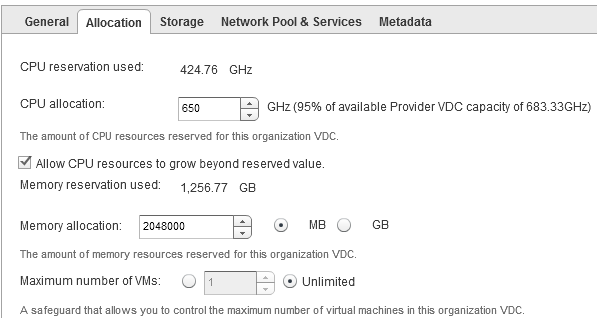
There’s a few things we can see that are useful:
- CPU Reservation Used
- CPU Allocation from the PVDC
- Memory Reservation Used
- Memory Allocation
- Maximum number of VMs
But they’re not named similar in vROps. Because that would be too easy. All vROps metrics are from the OrgVDC object.
| VDC Label Name | VDC Value | vROps Metric | vROps Value |
| CPU Reservation Used | 424.76 GHz | CPU|Used (MHz) | 424,760 |
| CPU Allocation | 650 Ghz | CPU|Allocation (MHz) | 650,000 |
| Memory Reservation Used | 1,256.77 GB | Memory|Used (GB) | 1,256.7744 |
| Memory Allocation | 2048000 MB | Memory|Allocation (MB) | 2,048,000 |
| Max number of VMs | Unlimited | General|Max Number of VMs | 0 |
That’s not so hard. Nope, Reservation is fairly straight-forward. But Pay-As-You-Go (PAYG) is a different story.
PAYG can use quotas to allocation resources, and then allows a percentage of that quota to be guaranteed. To further up the ante it also allows for a different vCPU speed to be used against what’s actually in the physical server.
Lets get some numbers.
I have 1 cluster with 7 hosts, each host has 2 sockets and 18 cores per socket (36 logical processors). My socket speed is 3Ghz. This gives my cluster 756000 ((36 * 3000)*7) cycles total capacity. I can set the quota in VCD to unlimited (use all of it) or a set below it, but for simplicity I’ll set it to unlimited, so my single OrgVDC can use all 756Ghz (and don’t forget you can allocate multiple OrgVDC to a single PVDC. Do you hear contention?), but I’ll set a guarantee of 90%. On top of that I don’t want to tell VCD it’s using 3GHz processors, but 2.55Ghz processors.
Something like:

As before there’s interesting and useful data here about how I INTEND my environment to be consumed:
- CPU Allocation Used
- CPU Quota
- CPU Resources Guaranteed
- vCPU Speed
- Memory Allocation Used
- Memory Quota
- Memory Resources Guaranteed
- Maximum number of VMs
To vROps we go:
| VDC Label Name | VDC Value | vROps Metric | vROps Value |
| CPU Allocation Used | 688.50 GHz | CPU|Used (GHz) | 688.5 |
| CPU Quota | Unlimited | <NOPE> | <NOPE> |
| CPU Resources Guaranteed | 90% | <NOPE> | <NOPE> |
| vCPU Speed | 2.55 GHz | CPU|vCPU Speed (GHz) | 2.55 |
| Memory Allocation Used | 2,269.00 GB | Memory|Used (GB) | 2,269 |
| Memory Quota | Unlimited | <NOPE> | <NOPE> |
| Mem Resources Guaranteed | 90% | <NOPE> | <NOPE> |
| Max number of VMs | Unlimited | General|Max Number of VMs | 0 |
Well that’s unexpected. How can you monitor your VDC PAYG models when vROps doesn’t have appropriate metrics?
Time for a cup of tea.

What is the quota?
The quota is the maximum amount of resources that can be consumed. An OrgVDC can never use more than the parent PVDC can provide. So any quota that is unlimited is essentially limited to the PVDC value.
If the OrgVDC has got a quota set (not unlimited), then CPU|Allocation and Memory|Allocation should be the vROps metrics (75% sure; my notes are unreadable on this).
Getting the parent PVDC to a OrgVDC is a supermetric. That’s not so difficult:
min(${adaptertype=vCloud, objecttype=PRO_VDC, metric=cpu|total, depth=-1})
The ‘depth=-1’ means go upwards, aka my parent. Apply to all OrgVDC’s and now you know how much capacity the parent has (for CPU in this example).
How to find Guarantee we need to understand how VCD relates to VMs:
pVDC -> orgVDC -> vApp -> VM
The similar vSphere relationship:
vCenter -> DataCentre -> Cluster -> Resource Pool -> vApp -> VM
But vROps is getting information from vSphere and where does vSphere set reservations and limits; on Resource Pools or individual VMs. VCD uses the limits and reservations on a VM.
Therefore you need two more supermetrics (or four: 2 for CPU and 2 for RAM);
- One to create a reservation total for each vApp (based on the sum of all vApp child VMs), applied at a vAPP object.
sum(${adaptertype=VMWARE, objecttype=VirtualMachine, metric=config|cpuAllocation|reservation, depth=1})
- One to sum the vApp SM for the OrgVDC, applied at an OrgVDC object.
sum(${adaptertype=vCloud, objecttype=VAPP, metric=Super Metric|sm_<ID of one above>, depth=1})
I tried to make a single supermetric but the system I was using wasn’t having any of it.
So now our OrgVDC object has the following supermetrics. This is a fleshed out model.
| VDC Label Name | VDC Value | vROps Metric | vROps Value |
| CPU Allocation Used | 688.50 GHz | CPU|Used (GHz) | 688.5 |
| CPU Quota | Unlimited | SM – Parent CPU Total | <756> |
| CPU Resources Guaranteed | 90% | SM – Child VM CPU Reservations | <See Below> |
| vCPU Speed | 2.55 GHz | CPU|vCPU Speed (GHz) | 2.55 |
| Memory Allocation Used | 2,269.00 GB | Memory|Used (GB) | 2,269 |
| Memory Quota | Unlimited | SM – Parent Mem Total | <10,240> |
| Mem Resources Guaranteed | 90% | SM – Child VM Mem Reservations | <7.3> |
| Max number of VMs | Unlimited | General|Max Number of VMs | 0 |
Ah, yeah, vCPU reservations on VMs. Do you remember way back I mentioned that you can use a different vCPU speed to the actual processor. Well, it’s time for that to make a guest appearance.
When VCD is setting the limit on the VM it’s taking that vCPU speed and mulitplying it via the number of vCPUs in the VM and using that value as the CPU limit.
2 vCPU machine on my 2.55Ghz vCPU speed VM is a limit of 4.6Ghz. BUT when a VM is started up the CPU speed is determined by the actual processor speed in the physical host, in my example earlier 3Ghz, so the total capacity of the VM vCPU is actually 2 vCPU * 3Ghz = 6GHz total capacity, so the VM has:
| Total Capacity as determined by vSphere | 6Ghz |
| Total Capacity as intended by VCD | 4.6Ghz |
| Limit as set by VCD at 100% and enforced by vSphere | 4.6Ghz |
| Reservation as set by VCD at 90% and enforced by vSphere | 4.14Ghz |
Notice that the Limit and the Total Capacity are very different. That will appear as Contention in vROps if the VM is under load. Better make sure your capacity planning processes are up to speed.
One thing to be conscious of is the values that are being used. VCD works in MB and GB, Mhz and GHz. vROps typically works in MB and MHz. There’s no way to resize the units with supermetrics (EDIT: vROps 8.1 can adjust units in SuperMetrics but as of this blog post I’ve not tested it).
So why do all this?
Monitoring. Performance and Capacity. At the most basic level it’s very hard to determine the Total Capacity vs Allocated vs Demand vs Reservation vs Guarantee across VCD OrgVDCs. The metrics don’t line up. VCD is about intentions but the enforcement is done by vSphere and as the vCPU Speed example shows, Intention and Reality don’t always work seamlessly and you need that operational intelligence to understand whats actually going on; what are the VMs that deliver your services to your customers actually doing.
So all that said, what did this eventually lead to?
With some VMware PSO magic, a trend line on a graph.
 Chapter 42