
Amongst the many tools that I tinker with exists vRealize Network Insight, aka vRNI (vern-e), aka Arkin. VMware bought Arkin back in 2016 and it became the vRNI that we know and love today.
vRNI has a slightly different architecture model to vROps. It consists of a platform component and some proxies / collectors.
The proxies / collectors (for they appear to be having something of a rebrand and are called both interchangeably at the moment) connect to the datasources, collect information, do some pre-processing and forward that data onwards to the platform.
There are two major differences to how vROps Remote Collectors work. vRNI collectors:
- Do some pre-processing and statistic generation.
- Store information in the event that the platform isn’t available.
The most basic deployment looks like this:

The Collector connects the the vCenter, NSX and the physical network and sends the data to the platform. The platform consists of a single node. The end-users will only ever talk to the platform system.
More advanced deployments will need more platform nodes (thats not a revelation btw), so an advanced one might look like this:
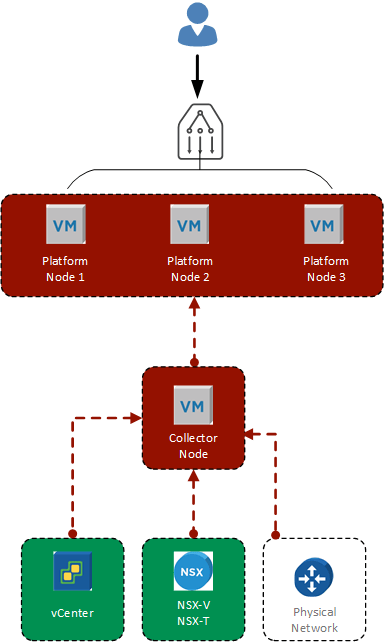
NOTE: There’s no reason why you would need three platform nodes for a single collector.
The important point to see here is that the three platform nodes are fronted by a load balancer. The end-user would then be sent to the most appropriate platform node as determined by your LB config.
There are a few things to note about building a vRNI platform cluster:
- It’s not a HA cluster, it’s a performance cluster. There’s NO HA in vRNI. Lose a single node and your cluster is offline.
- The UI is presented from Node 1, you can log via other nodes, but AFAIK you’re being proxied to Node 1
That last point is my understanding of the behaviour of vRNI.
You now have some concept of the vRNI cluster, lets get to the topic of the post; certificates.
VMware have a lifecycle product for the vRealize suite of products called vRealize Suite Lifecycle Manger (vRSLCM, yes it has an ‘S’ in the acronym and yes, no other vRealize Suite product does).
In an ideal world you would be using vRSLCM to handle things like pushing certificates because it makes it really easy and by default all VMware products have self-signed certificates. Because you are replacing the self-signed certificates? Right…
The format for the certificate is the normal straight forward configuration:
- The Common Name is the FQDN of the load-balancer URL
- The SAN names are the FQDN of the LB and the 3 platform nodes
And the process is the normal procedure:
- Generate the .csr, send it off and get the SSL cert back.
- Build the full certificate (service certificate / private key / intermediary CA, root CA).
Upload it to vRLSCM and off it goes and replaces the self-signed certificate. You can log in to Node 1 and it works.
Success.
You check Node 2 and… warning, same with node 3.
Earlier I mentioned that vRNI UI is only on Node 1. vRSLCM only replaces the certificate on Node 1:
So that’s unexpected, makes sense if node 1 is the only UI server, but annoying. I’m wondering if it’s possible to update the certificates on the other nodes manually. You can certainly update the certificate manually on a single node. That’s fairly easy and the same process should work for the other nodes.
If I decide to do this I’ll make sure to blog about it.
 Chapter 42