Allocation Model in vROps 7.5+

History Recap: In vRealize Operations 6.7 the capacity engine was re-engineered and the Allocation modelling capability was removed before being re-added in vRealize Operations 7.5. There’s no Allocation in vRops 6.7 to 7.0. You also need to enable Allocation in the policies in vROps 7.5, it’s not turned on out of the box (OOTB).

There are two primary classifications of reviewing capacity within vRealize Operations:

Demand – Capacity based upon the actual requested resource consumption (i.e. demand). Demand-based modelling is typically used by Managed Service Providers (MSP) as it represents the actual usage of the environment which has been licensed to other users. The more accurate the model. the more resources can be sold and the more money is made (let’s be honest it’s about the money!).

Allocation – The total consumption of a resource if it theoretically was used at 100% all the time. This is an older model that can be much simpler as it’s essentially just a subtraction from the total capacity. I typically find allocation in larger organisations where the IT infrastructure supports various different business organisations and cross-charging (or chargeback) is performed to help offset the IT costs. It’s also much easier to plan with as simply when it gets up to roughly ~75% allocated, you buy more hardware.

I’m going to talk about the Allocation model. As I see it, the allocation model has two primary use-cases, each with its own distinct event horizon (this is my terminology):

Short event horizon: I’m deploying new objects (VMs / Containers / whatever) right now or in the next few days. I need to know what the available capacity is right now. Therefore my usable capacity must exclude all resource providers (hosts, storage etc) that are not contributing (aka offline, in maintenance mode etc) to the capacity.

Long event horizon: I’m deploying new objects in a year. This is important when it takes a long time to purchase and prepare new hardware. Therefore my usable capacity should take the assumption that all of the resource providers are online and available. There’s probably no reason (I have one or two TBH, but that’s not the point here) for a resource provider to be offline / in maintenance mode for an extended period of time.

The Allocation model in vROps 6.6.1 was based upon the long event horizon. Hosts that where in maintenance mode were included in the usable capacity metrics.

The Allocation model in in vROps 7.5+ is based upon the short event horizon. Hosts that are in maintenance mode are not included in usable capacity.

vROps 8.1 Allocation Usable Capacity

Is this a problem?

It depends on the exact methodology used when trying to do long term planning. In large environments it’s a constant job to lifecycle manage the underlying infrastructure. There are almost always hosts in maintenance mode for patching and the inevitable hosts that are just going pop (at night, it’s always at night!).

It’s also worth remembering that the capacity planners (long-term) are not the same people that are often doing the deployments (short-term). There’s a whole raft of reasons the capacity planners might not even have access to vROps (operational, cultural, procedural), so the long term capacity planning might actually be done via data extract and not the UI. So that lovely ‘What-if’ functionality isn’t used (DevOps and SREs are typically code driven).

What does this affect?

This behaviour is seen in the following two metrics:

  • CPU|Allocation|Usable Capacity after HA and Buffer
  • Memory|Allocation|Usable Capacity after HA and Buffer

As far as I’m aware Disk Space|Allocation”Usable Capacity after HA and Buffer doesn’t have this behaviour (as you’d expected TBH).

I have this problem, what can I do about it?

In the most basic long term allocation modelling it’s fairly straight-forward to model using supermetrics.

For example, let’s talk about CPU.

The allocation model, at the cluster level, models CPU capacity as vCPU. That is the total number of vCPU that can be deployed.

The standard OOTB metric for this is ‘CPU|Allocation|Usable Capacity after HA and Buffer‘ and it will show a usable capacity and this metric will vary depending on if hosts are in maintenance mode <See image above>.

Lets build a basic replacement that doesn’t care if hosts are in maintenance mode.

This calculation can be something fairly simple as:

((CPU|Number of physical CPUs (Cores) * ratio) * Cluster Configuration|DAS Configuration|Admission Control Policy|CPU Failover Resource Percent)) – (((CPU|Number of physical CPUs (Cores) * ratio) * Cluster Configuration|DAS Configuration|Admission Control Policy|CPU Failover Resource Percent)* buffer)) = Cluster Usable Capacity vCPU

Let’s use some numbers to see how this works. I’ve assumed the following (OOTB represents the vROps OOTB metric name if you need it):

  • Number of hosts in a cluster = 12
    • (OOTB: Summary|Total Number of Hosts)
  • Number of cores per host = 20
  • Number of physical CPUs in a cluster (or cores * hosts) = 240
    • (OOTB: CPU|Number of physical CPUs (Cores)) – this is variable though as it excludes hosts in MM.
  • Desired Ratio = 4:1
  • HA FTT = 1 Host
    • (OOTB: Cluster Configuration|DAS Configuration|Admission Control Policy|CPU Failover Resource Percent)
  • vROps additional Buffer = 5%

To the math:

(Total Hosts * Cores per host) = 240 physical cores (or OOTB: CPU|Number of physical CPUs (Cores))

240 * Ratio (4:1) = 960 vCPUs Total Capacity

(This could be a cool SM if you wanted to know the total number of vCPUs for a cluster, which vROps currently doesn’t tell you).

960 vCPU TC – OOTB: Cluster Configuration|DAS Configuration|Admission Control Policy|CPU Failover Resource Percent (8%) = 960 * 0.92 = 883.2 vCPU

883.2 * vROps buffer (5%) = 883.2 * 0.95 = 839.04 vCPU

Wrap the whole metric in the floor() function to get 839 vCPU as your usable HA content that will not change if hosts are in maintenance mode.

You can do something similar for Memory|Allocation|Usable Capacity after HA and Buffer as well, and that should be simpler.

NOTE: I’ve simplified the calculations above from the eventual supermetric customer delivered supermetric, and due to the hosting platform I currently can’t get formula’s to look nice so a few brackets might be misplaced.

How complicated can the supermetrics get?

Very very complicated depending on your particular requirements. Go beyond the very basics and it can include vROps SM if statements, which statements, arrays. Quite advanced supermetric stuff and if you really want to go to town, calculations scripted outside of vROps and then inserted into vROps.

If you’re really struggling I would recommend engaging with VMware about getting Professional Services involved.
vROps and VCD – Speaking a common language

What’s this? Another blog entry. Clearly I’m not busy.

For the last few years I’ve been helping a few telcos (mobile phone providers for the layman) with their monitoring requirements for the various platforms (4G and 5G). At this point they’ve been using VMware’s NFV bundle, which consists of vSphere (or Openstack), vSAN, NSX, vROps, vRLI, VRNI (optional) and VCD. Whew that’s a lot of product acronyms and it includes VCD; aka VMware Cloud Director or vRA for people that need multi-tenancy.

WARNING, that’s a massive simplification of both products but hey I do monitoring, automation was a decade ago using scripts and powershell, I don’t need vRA or vRO to build VCF (/rasp).

But wasn’t VCD discontinued? Err, yeah but no. Dull story about business requirements and market opportunities, blah blah blah. Anyway, it’s still around and it’s good if you need it.

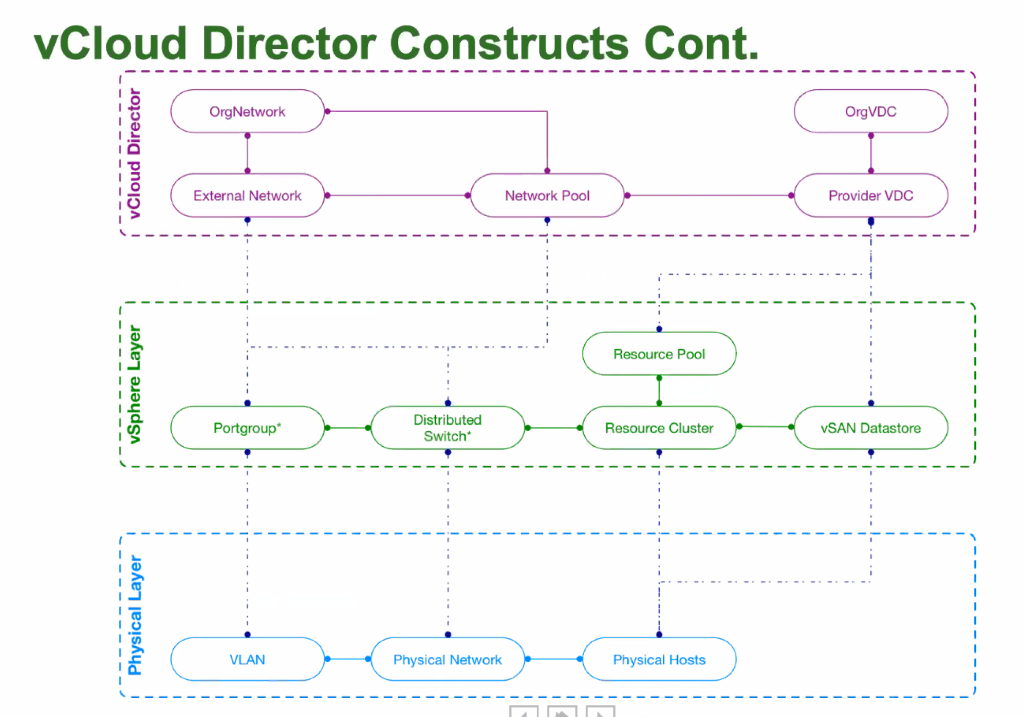
A few things about how VCD structures stuff. The underlying physical hardware is grouped into normal vSphere clusters. This is presented via VCD as a Provider VDC (VDC = Organisation Virtual DataCentre). The PVDC is then used to provide the resources to a group called the Organisation VDC. The OrgVDC is basically a resource pool, with reservations and limits, that a end customer, called a tenant, can then consume.

Clear.

Nope. It can be complicated and they use totally different names for vSphere constructs. I was going to make a picture to illustrate this, but I stole one a long time ago (apologies to whomever made this but it’s mine now. I licked it):

vCIoud Director Constructs
Not my image of VCD constructs.

To adequately monitoring this you need to connect vROps to VCD. There’s a management pack for this. You need to be very careful to get the correct management pack that supports the version of VCD. There are two components:

  • The management pack which connects to VCD
  • The tenant OVA, which is an appliance which is a static application that merges data from VCD and vROps into a few static dashboards for tenants (end-users).

I’m going to talk about the VCD MP.

Firstly; the VCD MP that is compatible with vROps 6.7 does not capture metadata from VCD. It’s also incomplete and uses (or used it might have finally been fixed) the VCD User API interface not the VCD Admin API so its missing various metrics (or it has bugs some may say). You can script around this and then inject the metrics into VCD. Kinda cool, but its custom and GSS fear the word ‘custom’.

vROps 7 and its associated VCD MP fixed a bunch of these issues. To collect the metadata enable ‘Advanced Metrics’ in the VCD MP configuration in vROps.

Now for the ‘fun’ stuff.

A OrgVDC in VCD can be Reservation or Pay-As-You-go and they have the ability to guarantee resources.

Guarantee.

Don’t recall seeing that in vSphere and vROps; because it’s not a term we use.

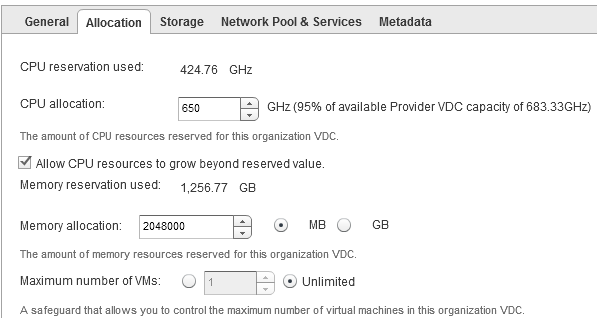
Lets look at a typical Reservation pool OrgVDC configuration:

An example of a VCD reservation pool OrgVDC
VCD reservation pool OrgVDC

There’s a few things we can see that are useful:

  • CPU Reservation Used
  • CPU Allocation from the PVDC
  • Memory Reservation Used
  • Memory Allocation
  • Maximum number of VMs

But they’re not named similar in vROps. Because that would be too easy. All vROps metrics are from the OrgVDC object.

VDC Label NameVDC ValuevROps MetricvROps Value
CPU Reservation Used424.76 GHzCPU|Used (MHz)424,760
CPU Allocation650 GhzCPU|Allocation (MHz)650,000
Memory Reservation Used1,256.77 GBMemory|Used (GB)1,256.7744
Memory Allocation2048000 MBMemory|Allocation (MB)2,048,000
Max number of VMsUnlimitedGeneral|Max Number of VMs0
VCD-2-vROps Reservation Pool

That’s not so hard. Nope, Reservation is fairly straight-forward. But Pay-As-You-Go (PAYG) is a different story.

PAYG can use quotas to allocation resources, and then allows a percentage of that quota to be guaranteed. To further up the ante it also allows for a different vCPU speed to be used against what’s actually in the physical server.

Lets get some numbers.

I have 1 cluster with 7 hosts, each host has 2 sockets and 18 cores per socket (36 logical processors). My socket speed is 3Ghz. This gives my cluster 756000 ((36 * 3000)*7) cycles total capacity. I can set the quota in VCD to unlimited (use all of it) or a set below it, but for simplicity I’ll set it to unlimited, so my single OrgVDC can use all 756Ghz (and don’t forget you can allocate multiple OrgVDC to a single PVDC. Do you hear contention?), but I’ll set a guarantee of 90%. On top of that I don’t want to tell VCD it’s using 3GHz processors, but 2.55Ghz processors.

Something like:

An example from VCD of a PAYG Pool OrgVDC
VCD PAYG Pool

As before there’s interesting and useful data here about how I INTEND my environment to be consumed:

  • CPU Allocation Used
  • CPU Quota
  • CPU Resources Guaranteed
  • vCPU Speed
  • Memory Allocation Used
  • Memory Quota
  • Memory Resources Guaranteed
  • Maximum number of VMs

To vROps we go:

VDC Label NameVDC ValuevROps MetricvROps Value
CPU Allocation Used688.50 GHzCPU|Used (GHz)688.5
CPU QuotaUnlimited<NOPE><NOPE>
CPU Resources Guaranteed90%<NOPE><NOPE>
vCPU Speed2.55 GHzCPU|vCPU Speed (GHz)2.55
Memory Allocation Used2,269.00 GBMemory|Used (GB)2,269
Memory QuotaUnlimited<NOPE><NOPE>
Mem Resources Guaranteed90%<NOPE><NOPE>
Max number of VMsUnlimitedGeneral|Max Number of VMs0
VCD-2-vROps Reservation Pool

Well that’s unexpected. How can you monitor your VDC PAYG models when vROps doesn’t have appropriate metrics?

Time for a cup of tea.

Defiantly not coffee.
Real people drink coffee

What is the quota?

The quota is the maximum amount of resources that can be consumed. An OrgVDC can never use more than the parent PVDC can provide. So any quota that is unlimited is essentially limited to the PVDC value.

If the OrgVDC has got a quota set (not unlimited), then CPU|Allocation and Memory|Allocation should be the vROps metrics (75% sure; my notes are unreadable on this).

Getting the parent PVDC to a OrgVDC is a supermetric. That’s not so difficult:

min(${adaptertype=vCloud, objecttype=PRO_VDC, metric=cpu|total, depth=-1})

The ‘depth=-1’ means go upwards, aka my parent. Apply to all OrgVDC’s and now you know how much capacity the parent has (for CPU in this example).

How to find Guarantee we need to understand how VCD relates to VMs:

pVDC -> orgVDC -> vApp -> VM

The similar vSphere relationship:

vCenter -> DataCentre -> Cluster -> Resource Pool -> vApp -> VM

But vROps is getting information from vSphere and where does vSphere set reservations and limits; on Resource Pools or individual VMs. VCD uses the limits and reservations on a VM.

Therefore you need two more supermetrics (or four: 2 for CPU and 2 for RAM);

  • One to create a reservation total for each vApp (based on the sum of all vApp child VMs), applied at a vAPP object.

sum(${adaptertype=VMWARE, objecttype=VirtualMachine, metric=config|cpuAllocation|reservation, depth=1})

  • One to sum the vApp SM for the OrgVDC, applied at an OrgVDC object.

sum(${adaptertype=vCloud, objecttype=VAPP, metric=Super Metric|sm_<ID of one above>, depth=1})

I tried to make a single supermetric but the system I was using wasn’t having any of it.

So now our OrgVDC object has the following supermetrics. This is a fleshed out model.

VDC Label NameVDC ValuevROps MetricvROps Value
CPU Allocation Used688.50 GHzCPU|Used (GHz)688.5
CPU QuotaUnlimitedSM – Parent CPU Total<756>
CPU Resources Guaranteed90%SM – Child VM CPU Reservations<See Below>
vCPU Speed2.55 GHzCPU|vCPU Speed (GHz)2.55
Memory Allocation Used2,269.00 GBMemory|Used (GB)2,269
Memory QuotaUnlimitedSM – Parent Mem Total<10,240>
Mem Resources Guaranteed90%SM – Child VM Mem Reservations<7.3>
Max number of VMsUnlimitedGeneral|Max Number of VMs0
VCD-2-vROps Reservation Pool with SuperMetrics

Ah, yeah, vCPU reservations on VMs. Do you remember way back I mentioned that you can use a different vCPU speed to the actual processor. Well, it’s time for that to make a guest appearance.

When VCD is setting the limit on the VM it’s taking that vCPU speed and mulitplying it via the number of vCPUs in the VM and using that value as the CPU limit.

2 vCPU machine on my 2.55Ghz vCPU speed VM is a limit of 4.6Ghz. BUT when a VM is started up the CPU speed is determined by the actual processor speed in the physical host, in my example earlier 3Ghz, so the total capacity of the VM vCPU is actually 2 vCPU * 3Ghz = 6GHz total capacity, so the VM has:

Total Capacity as determined by vSphere6Ghz
Total Capacity as intended by VCD4.6Ghz
Limit as set by VCD at 100% and enforced by vSphere4.6Ghz
Reservation as set by VCD at 90% and enforced by vSphere4.14Ghz
VCD Intention vs vSphere Reality

Notice that the Limit and the Total Capacity are very different. That will appear as Contention in vROps if the VM is under load. Better make sure your capacity planning processes are up to speed.

One thing to be conscious of is the values that are being used. VCD works in MB and GB, Mhz and GHz. vROps typically works in MB and MHz. There’s no way to resize the units with supermetrics (EDIT: vROps 8.1 can adjust units in SuperMetrics but as of this blog post I’ve not tested it).

So why do all this?

Monitoring. Performance and Capacity. At the most basic level it’s very hard to determine the Total Capacity vs Allocated vs Demand vs Reservation vs Guarantee across VCD OrgVDCs. The metrics don’t line up. VCD is about intentions but the enforcement is done by vSphere and as the vCPU Speed example shows, Intention and Reality don’t always work seamlessly and you need that operational intelligence to understand whats actually going on; what are the VMs that deliver your services to your customers actually doing.

So all that said, what did this eventually lead to?

With some VMware PSO magic, a trend line on a graph.