As Grandfather Nurgle blesses Terra with his latest gift I decided to have a little play with vRealize Operations 8.0 and Continuous Availability (CA).
CA (for I’m not writing continuous availability all the time) is the enhancement for vROps HA that introduces fault domains. Basically HA across two zones with a witness on a third location to provide quorum.
I’m not going into the detail about setting CA up (slide a box, add a data node and a witness node). Lets look at three things that I’ve been asked about CA.
Question 1; Can I perform a rolling upgrade between the two fault domains ensuring that my vROps installation is always monitoring?
No. The upgrade procedure appears to be the same, both FDs need to be online and accessible and they both get restarted during the upgrade. There’s no monitoring.
I hope that in a coming version this functionality appears (and I’ve no insight, no roadmap visibility) because we’ve asked a few times over the years.
Question 2; How does it work in reality?
Aha. Finally, take that marketing. A free thinking drone from sector sieben-gruben.
Lets build it and find out. So I did.
The environment is a very small deployment:
2 Clusters, consisting of a VC 6.7, a single host (ESXi 6.7)
- vROps 8.0 was deployed using a Very Small deployment to the two clusters, a node in each.
- The witness node was deployed externally as a workstation VM.
- The entire thing is running in under 45GB of RAM and on a SATA disk (yeah SATA!)
- CA was then enabled and upgraded to 8.0.1 Hotfix (which answered Q1).
Which looks like this:

The node called Latency-2 (dull story, just go with it!) is the master node, so lets rip the shoes of that bad boy and watch what happens…

Straight away the admin console started to spin it’s wheels
Then it came back and the Master node is now Inaccessible with the CA ‘Enabled, degraded’
It’s 2.50mins and the UI as a normal user is usable, slow, with a few warnings occasionally, but usable. The Analytics service is restarting on the Replica node.

An admin screen refresh later and the Replica is now the Master and the analytical service is restarted. The UI is running. Total time, 5.34min.
Not too shabby.

Note that the FD2 is showing as online but the single member node is offline.
I wonder if the ‘offline’ node knows it’s been demoted to Replica?
A quick check of the db.script reveals that it’s actually offline with a ‘split_brain’ message and it appears to be ready to rejoin with a role of ‘Null;.
Lets put it’s shoes back on and see what happens:
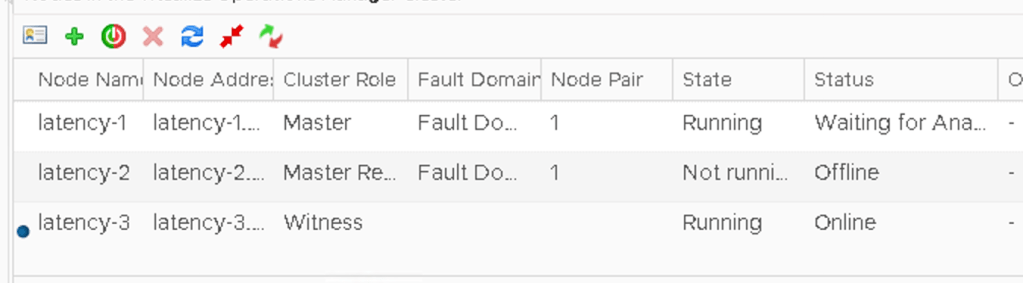
The missing node is back and as the replica, albeit offline. The UI isn’t usable and is giving platform services errors.
At this point I broke it completely and I had to force the cluster offline and bring it back online. However, I’ve done this CA failover operation a few times and it’s worked absolutely fine so whilst I’m pleased it broke this time, for me it highlights how fragile CA is.
Anyway, it didn’t come back online. It was stuck waiting on analytics. Usually this means a GSS call.
 Chapter 42